 Tom Greenaway
Building a blog editor for any static site with AI & Antigravity
My blog is a simple static files hosted website deployed on Cloudflare. All my pages and articles are simple markdown files which are built into the final HTML pages. Nothing fancy.
But sometimes I wish it was fancier. As much as I like the simplicity of writing raw markdown and focusing on the content, sometimes I also like the shortcut of highlighting text and bolding it in a rich text editor or having the preview of a WYSIWYG editor.
Furthermore, as I’ve been living more inside tools like Antigravity and Claude Code and there aren’t traditional text editing tools built into them, I had this desire to come up with a way to “edit my blog” manually inside those AI harnesses.
So I imagined: what if I could create an AI Skill that presented a nice manual editing interface for my blog inside the AI tools and what if it let me focus on markdown files or preview the final result in my blog – or let me edit the text as if I was writing a Medium article, but visually keep it in my blog’s markup and CSS?
And finally, what if this AI skill could be designed in such a way that it could bring this experience to anyone’s statically hosted blog? Regardless if they used a framework or rolled it together themselves?
Well, the answer is yes! It took less than a day to build. And I wrote this article using it too.
Getting started
You can install the AI skill & plugin via my Github skills repo here.
Then inside Antigravity or Claude Code, type the new command: /blog-editor in a project/conversation that points at your own blog.
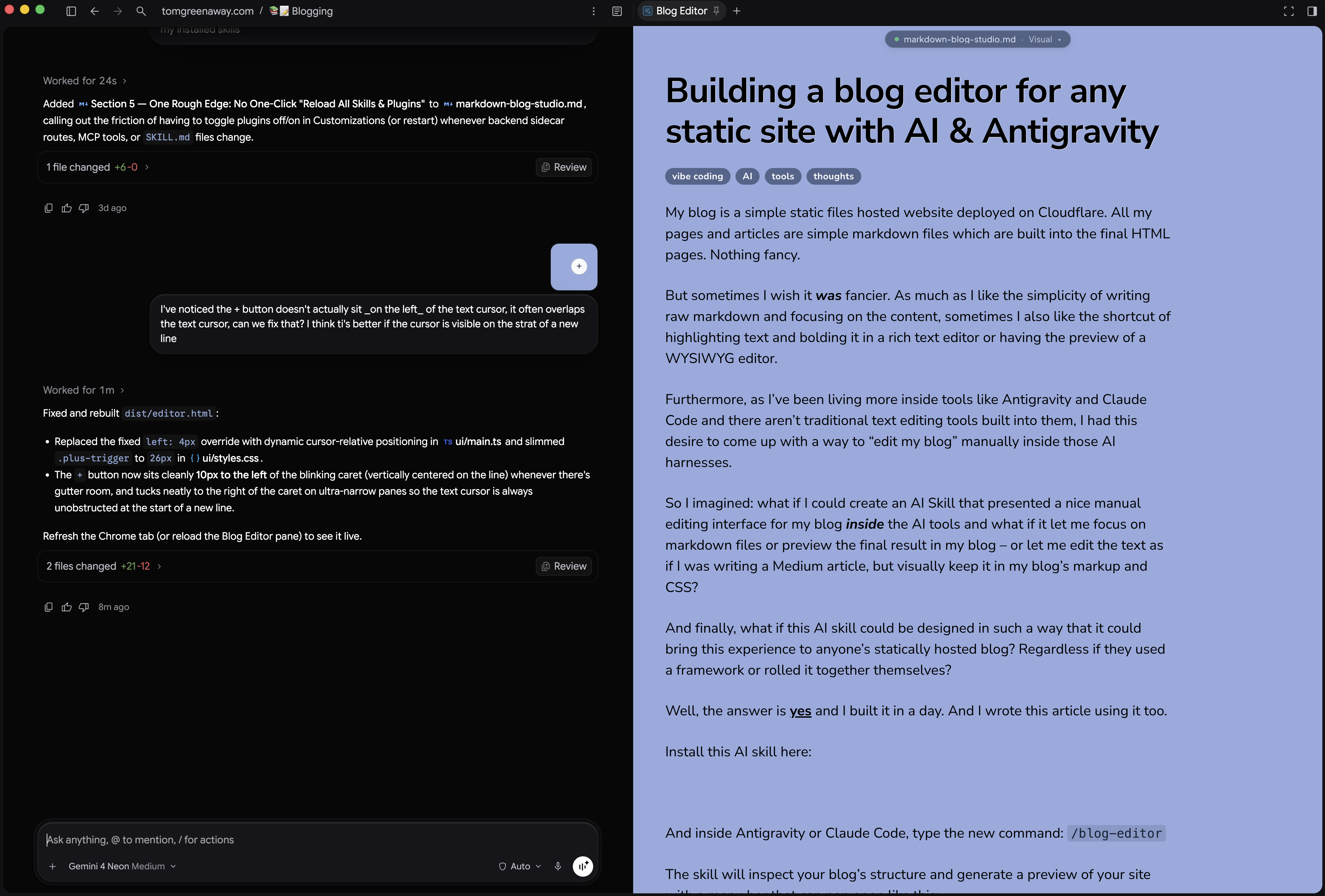
The skill & plugin will inspect your blog’s structure and generate a preview of your site inside Antigravity like this:
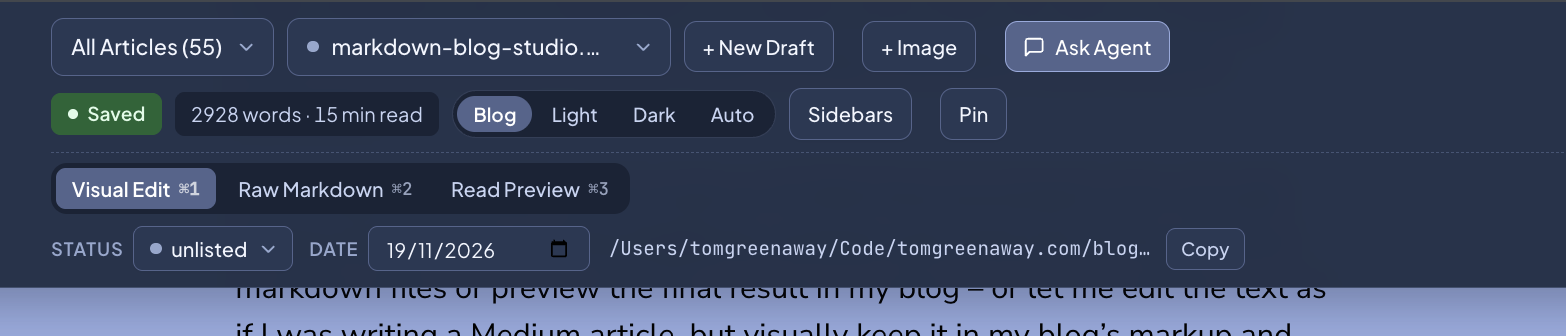
With a menu bar that can pop open like this:
And when collapsed, it looks like this:

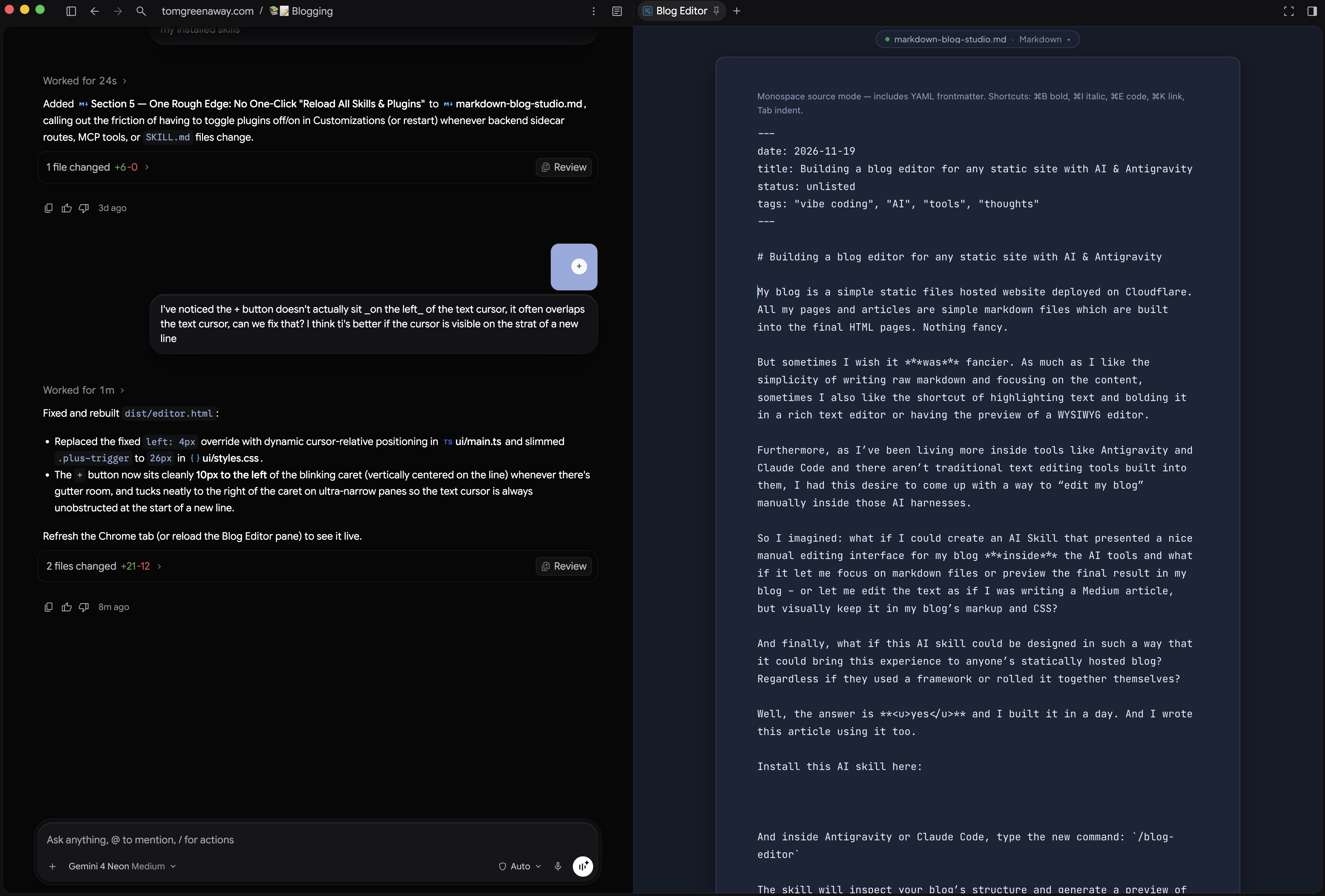
And of course, if you want to focus on the markdown, you can toggle to that view too:
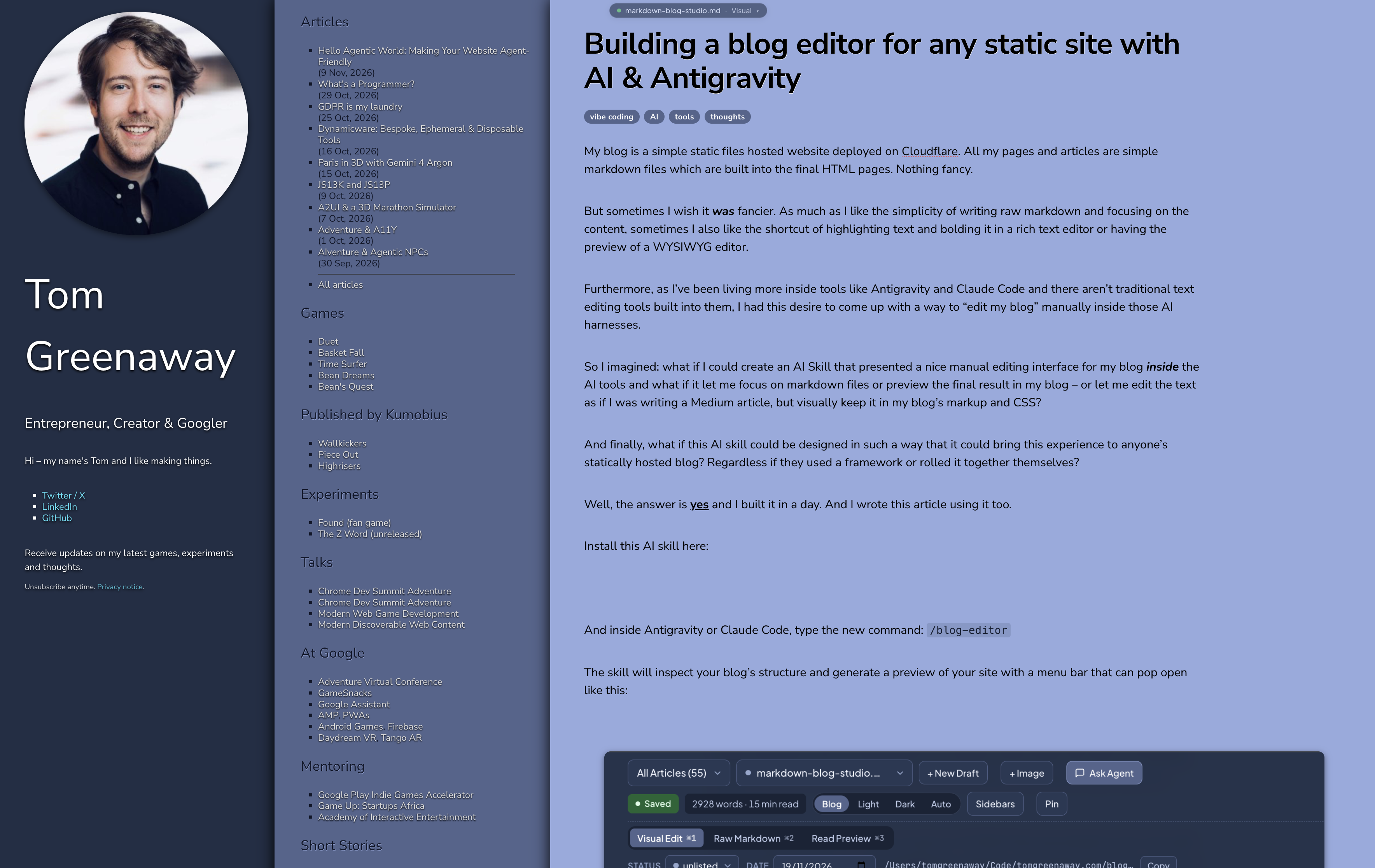
Or pop open a preview of your live site and check it out with the rest of your page’s UI:
Ultimately, this is a blog agnostic minimalist, live-themed Markdown editor that lives directly inside Antigravity's Auxiliary Side Pane as a UI customisation plugin (with a thin MCP App adapter so the same UI also runs in Claude Code if needed).
Why did I support Claude? Well, on my personal devices I actually use both Antigravity and Claude Code. Although lately I’ve been using AGY more and more since Gemini Neon became available.
How the Antigravity UI Customisation Works
In Antigravity, you can package a skill, an MCP server, and a sidecar web UI together as a single installable plugin under ~/.gemini/config/plugins/markdown-blog-studio/:
~/.gemini/config/plugins/markdown-blog-studio/
├── plugin.json                   # Plugin metadata & suggested prompts
├── skills/blog-editor/SKILL.md   # /blog-editor slash command + onboarding instructions
├── sidecars/editor/sidecar.json  # Registers the Aux Pane web UI entrypoint
└── mcp_config.json               # Optional MCP tools (focus post, read/save, Claude MCP App)
The heart of the Antigravity integration is sidecars/editor/sidecar.json, which declares a persistent Node process with "has_web_ui": true and an Auxiliary Pane view (SIDECAR_UI_ENTRYPOINT_AUX_PANE):
{
  "command": "node",
  "args": ["/path/to/markdown-blog-studio/sidecar/main.mjs"],
  "restart_policy": "always",
  "display_name": "Markdown Blog Studio",
  "has_web_ui": true,
  "ui_config": {
    "views": [
      { "path": "/", "entrypoint": "SIDECAR_UI_ENTRYPOINT_AUX_PANE", "title": "Blog Editor" }
    ]
  }
}
When you invoke /blog-editor (or ask the agent to open a draft), the skill emits a clickable sidecar:// link right inside chat – including deep-link query params like [Open post](sidecar://markdown-blog-studio/editor/?project=_root&slug=markdown-blog-studio).
Clicking that pill opens the web panel beside your conversation. Inside the panel, Antigravity injects /preload.js, giving the frontend three native hooks on window.sidecar:
window.sidecar.getWorkspaceUris(): Tells the editor which repository you're currently working in so it can auto-discover.blog-studio.jsonor your Markdown content folder.window.sidecar.fetch('/api/...'): Routes authenticated RPC calls straight tosidecar/main.mjs(SidecarApp), which handles disk reads, atomic saves, image uploads, and live site CSS loading.window.sidecar.agent.sendMessage(prompt): Powers the Ask Agent button – letting you highlight any sentence in Visual Edit and drop a structured prompt (file path + quoted excerpt + instruction) straight into your active chat.
Overall Architecture: a shared core, single-file UI with thin integration layers
Rather than tangling UI code, filesystem logic, and Antigravity SDK calls into one monolith, I split the project into three clean layers:
flowchart LR
    subgraph Core["1. Shared Node Core (core/)"]
        Config["site-config.mjs<br/>(.blog-studio.json + SSG discovery)"]
        Store["blog-store.mjs & frontmatter.mjs<br/>(atomic I/O + magic-byte assets)"]
        Theme["site-theme.mjs<br/>(live CSS @scope + sidebars)"]
    end

    subgraph Bundle["2. Single-File UI Bundle (ui/ → dist/editor.html)"]
        Editor["Tiptap v3 + Marked + DOMPurify<br/>(vite-plugin-singlefile)"]
        Bridge["HostBridge (ui/bridge.ts)"]
    end

    subgraph Hosts["3. Thin Host Adapters"]
        AGY["Antigravity Sidecar (sidecar/main.mjs)<br/>Aux Pane + window.sidecar + /blog-editor"]
        Chrome["Chrome Pop-Out (http-fallback.mjs)<br/>Hardened 127.0.0.1:3489 + CSRF/CSP"]
        MCP["MCP App Adapter (mcp/server.mjs)<br/>Optional Claude Desktop / Code support"]
    end

    Core --> AGY & Chrome & MCP
    Bundle --> AGY & Chrome & MCP
- Deterministic Shared Core (
core/): All the heavy lifting – path-traversal protection, symlink checks, atomic temp-file writes, lossless YAML frontmatter parsing, image magic-byte validation, and live CSS scoping – lives in plain dependency-light Node modules with unit tests. - Single-File UI Bundle (
dist/editor.html): Using Vite +vite-plugin-singlefile, the Markdown editor and serializer,DOMPurifysanitizer, and CSS compiles into one self-contained HTML file. That meanssidecar/main.mjsserves the whole app from a singleapp.page('/')route without wrestling with static asset URLs or bundler paths. - Thin Host Adapters +
HostBridge(ui/bridge.ts): All communication with AGY or Claude Code sits behind one TypeScript interface. At runtime,createHostBridge()checks whetherwindow.sidecaris present (Antigravity Aux Pane), whether it's running in a popped-out local browser tab (127.0.0.1:3489), or whether it's inside an MCP App iframe.
export async function createHostBridge(): Promise<{
  bridge: HostBridge;
  initialPayload?: StoreInitPayload;
}> {
  const assetCache = new Map<string, string>();
  const isSidecar = Boolean(window.sidecar);
  const deepLinkParams = readUrlDeepLinkParams();

  // Antigravity Sidecar Aux Pane or popped-out Chrome (127.0.0.1)
  if (isSidecar || (window.location.protocol.startsWith('http') && window.parent === window)) {
    const bridge = createHttpBridge(isSidecar, assetCache);
    return { bridge, initialPayload: await bridge.init(deepLinkParams) };
  }

  // Optional MCP Apps iframe fallback (e.g. Claude Desktop / Claude Code)
  const { bridge, connect } = createMcpBridge(assetCache);
  const initialFromTool = await connect();
  return { bridge, initialPayload: initialFromTool || (await bridge.init(deepLinkParams)) };
}
Polishing was the more time consuming part
As tradition dictates, getting the first working prototype up and running took a fraction of the time – smoothing out the real friction of actually using it took the most time.
1. Replicating my real blog's CSS
My first version looked like a generic Medium clone – cream background and black text. But I wanted it themed to my site.
Instead of hardcoding a copy of those styles into the plugin (which would inevitably drift), core/site-theme.mjs reads public/resources/reset.css, base.css, and highlight.css, and extracts the live .right-col background colour, strips out the legacy mobile-zoom media query, and wraps the whole thing inside CSS @scope:
@scope (.blog-site-theme-root) to (.blog-studio-ui-exempt) {
  /* live reset.css + base.css + highlight.css from tomgreenaway.com */
}
That to (.blog-studio-ui-exempt) boundary is a lifesaver: my real blog's base.css styles bare button elements in solid black, which would have wrecked the editor's own + block-insertion gutter menu without @scope carving out an exemption.
I added shortcuts as well so I could flip between the live preview and the raw markdown views (via ⌘1 and ⌘2).
2. Hiding the admin chrome until you reach for it
The first version showed all the admin bar UI at the top of the page all the time. I wanted that to be more minmalist and so I made it expand on hover.
3. Maintaining the scroll position across views.
Nothing breaks writing flow faster than being 600 words deep in Visual Edit, hitting ⌘2 to fix a Markdown link, and getting thrown back to line 1. So I needed to prompt it a few times to ensure the scroll position was consistent across different views.
4. Pop-Out to Chrome, Toggleable Sidebars, and Indexing All My Posts
Once the side-pane editor felt good, three more quality-of-life upgrades made it feel like a real daily driver:
- One-click pop out to Google Chrome: Sometimes I wanted to pop my editor out of Antigravity and focus even more on just a single page/window.
- Toggle-able real site sidebars: Previewing the rest of my site alongside the content became a toggle as sometimes it felt nice to know what the whole page would look like in the end.
- Missing articles: The initial markdown blog scanner missed some articles in my folder structure. Hopefully the AI skill is more flexible now.
5. No "Reload All Skills & Plugins" button
One genuine developer-experience annoyance I kept hitting while iterating on this plugin: there still isn't a simple way to refresh or reload all your installed skills and plugins in one go.
Frontend-only tweaks to dist/editor.html pick up as soon as you reload the pane, because sidecar/main.mjs reads the HTML file from disk per request. But the moment you change a backend sidecar route, an MCP tool, or a SKILL.md instruction, you end up opening the Customisations page to toggle the plugin off and back on – or restarting the host – just to flush the cached Node process and skill definitions.
When you're actively building and tweaking your own skills, a single "Refresh all installed skills & plugins" button (or slash command) would remove a lot of needless friction but I’m not aware of any in Antigravity to be honest.
Generalising it for any Markdown static site – theoretically
Once the editor felt great on tomgreenaway.com, I wanted to publish the plugin so anyone running a Markdown-based static site generator – Hugo, Astro, Jekyll or a any custom static site – could point it at their own repo and have it "just figure it all out."
Instead of trying to hardcode fragile heuristics for forty different SSGs inside the plugin, I split the problem cleanly between deterministic code and agent onboarding:
- Zero-config fallback: Out of the box, the plugin auto-detects common Markdown folders (
blog/,content/posts/,src/content/blog/,_posts/,posts/) and opens immediately in a clean Light/Dark studio view. - Declarative
.blog-studio.jsonsite profile: All site-specific knowledge –contentDir,staticDir,cssFiles,googleFonts,articleClasses, optionalchrome.columns, and any tinyoverrideCss– lives in one small JSON file at the root of the blog repo, with zero personal hardcoding left inside the plugin. - Agent-driven first-run setup: When you run
/blog-editorin a repo without.blog-studio.json, theblog-editorskill instructs the agent to inspect your templates, CSS, and built HTML once and generate.blog-studio.jsonfor you – automating the exact theme-discovery loop we did by hand.
That turns out to be a genuinely useful pattern for building shareable agent plugins: keep the runtime generic and declarative, and let the skill teach the agent how to configure it for each user's weird bespoke repo.
Conclusion
Building a custom UI plugin for your own agent workflow is a glimpse of where personal tooling is heading – right alongside Dynamicware – except instead of a throwaway localhost web app, the tool lives inside the agent itself.
There was a transition period where Browsers aggregated and abstracted apps away from being OS specific and suddenly it didn’t matter what OS you used, what mattered was if it had a web browser. The browser became your home of productivity – and desktop apps were replaced with web apps.
I’m now feeling a new transition where all my work lives in AI tools like (Antigravity or Claude Code) which “work/operate on my behalf” – aggregating the interactions I once had with bespoke and individual separate desktop or web apps. This will undoubtedly continue with the rise of more agentic tools like Gemini Tasks and Muse – aggregating our interaction with web services and so on.
Therefore I think it’s very interesting to see how we can build UI and workflows inside of these AI tools like Antigravity and others.
My producitivity hub is no longer my browser it’s a mix of my browser and my go-to AI tool (be it Antigravity or Claude Code). Which begs the question of whether these two paths will converge? And ultimately whether Chrome can become Antigravity faster than Claude Code can become a browser?
Article published on: